
MediBio Health and Fitness Tracker Review: Honest Hands-On Insight
Looking for an affordable fitness tracker that does it all? The MediBio Health & Fitness Tracker has been popping up across online marketplaces with bold claims: heart rate, blood pressure, temperature, sleep, steps, notifications, and more — all for under $25.
But is this budget wearable actually worth your time (and wrist space)? In this no-fluff review, I break down everything you need to know before you buy, from real-world use to app compatibility.
If you’ve searched terms like medibio health and fitness tracker this guide will help you sort the facts from the fluff. Whether you’re shopping for a medibio tracker, medibio smart band health fitness tracker, or even a medibio health fitness tracker for iPhone, keep reading for everything you need to know.
TL;DR
- Price: ~$15–$25
- Best for: Beginners, casual users, kids, seniors
- Avoid if: You need precise medical data or app ecosystem integration
- App: WearFit 2.0 (iOS/Android)
- Where to Buy: eBay, Amazon, third-party sellers
Pro Tip: Look for listings with free extra bands or color options.
What Is the MediBio Health and Fitness Tracker?
Let’s set the record straight: this isn’t made by the Australian medical-tech company Medibio (now TrivarX). Instead, it’s a generic smart band rebranded as MediBio, likely manufactured in Shenzhen, China. You’ll find the same core device (often listed as BY21S) under many different names online.
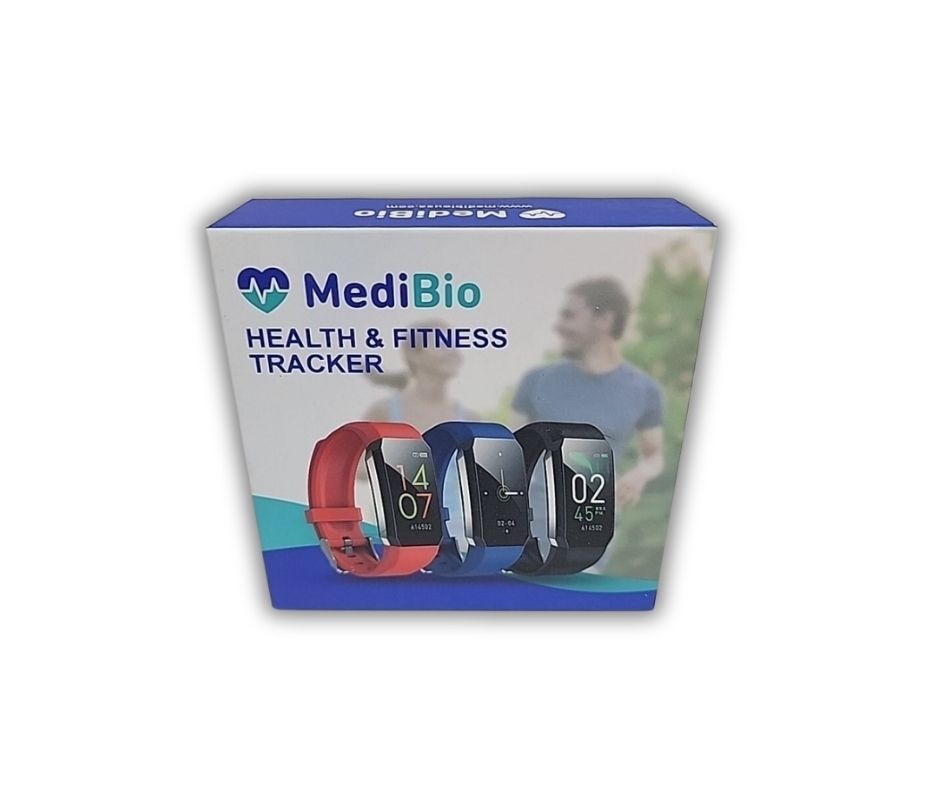
But don’t let the “no-name” branding scare you off just yet. For casual health tracking, this little band can actually hold its own.
Key Features (and What Works)
- Color Display: A bright 0.96” TFT screen with one-touch navigation. Small but surprisingly readable.
- Vitals Monitoring: Real-time heart rate, SpO2, and temperature tracking. Blood pressure estimates are included too, but take them with a grain of salt (not medical-grade).
- Activity Tracking: Steps, distance, calorie burn, and multi-sport modes.
- Sleep Tracking: Basic detection of sleep duration and patterns (light/deep).
- Smart Notifications: Get text, call, app, and calendar alerts right on your wrist.
- Sedentary Reminder, Alarm, and Stopwatch: Handy extras for daily life.
- IP67 Waterproof: Rain, sweat, and handwashing are fine. No swimming or hot showers.
- USB Charging: Pop off one strap and plug the watch directly into any USB port. No cables needed.
Medibio Smart Band Health Fitness Tracker
The Medibio Smart Band Health Fitness Tracker is essentially the same as other rebranded versions of this budget wearable. The term “smart band” refers to its slim, bracelet-style design and lightweight form factor. It’s ideal for:
- Users who want a compact and unobtrusive fitness tracker
- People who prefer simple tap-to-scroll navigation over full touchscreens
- Fitness newbies looking for step, heart rate, and sleep tracking without complexity
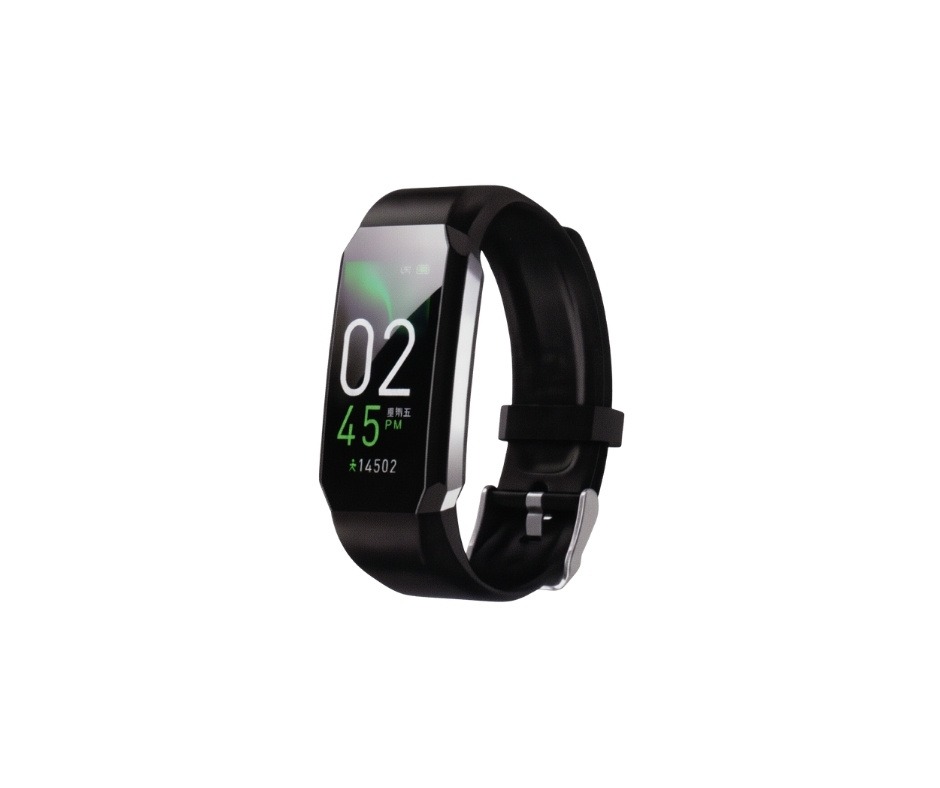
Despite the low cost, the smart band delivers basic insights across multiple health metrics. The design includes a soft silicone strap, basic clasp, and compact screen that makes it suitable for kids, seniors, or anyone wanting minimal bulk on the wrist.
When paired with the WearFit 2.0 app, the Medibio smart band syncs core data like:
- Step count and estimated distance
- Continuous or on-demand heart rate
- Estimated calorie burn
- Nightly sleep summaries
It’s not a smartwatch replacement, but as an entry-level health fitness tracker, it’s a surprisingly functional option for its price class.
MediBio Health and Fitness Tracker App
This tracker pairs with the WearFit 2.0 app, available for both iOS and Android. While it’s sometimes referred to as the “Medibio app” or “Medibio Health and Fitness Tracker App” in listings, the correct companion software is WearFit 2.0.

Here’s what you can expect:
- Clean dashboard showing heart rate trends, steps, sleep data, and vitals.
- Customizable notification settings.
- Sleep monitoring summaries (not very detailed but gives the basics).
- Firmware updates and watch face settings.
App permissions are a bit demanding (you’ll need to allow background access and notifications), but setup is simple once you’re in. Syncing is manual — open the app daily to keep data up to date.
Download WearFit 2.0:
Looking for the Medibio fitness app download or Medibio app download? Just grab WearFit 2.0 — it’s the same platform your tracker will connect to.
Medibio Health Fitness Tracker for iPhone
Yes, the Medibio Health Fitness Tracker for iPhone works — just download the WearFit 2.0 app from the Apple App Store and pair your device via Bluetooth. The iOS version of the app has a clean, intuitive layout that syncs your step count, heart rate, and sleep data effortlessly.
You’ll be able to:
- View a daily health dashboard with activity stats and vitals
- Set up call and message notifications from your iPhone
- Customize alarm, reminder, and sedentary alerts
- Track heart rate, sleep, and temperature data in trend charts
Although the app doesn’t integrate with Apple Health at the time of writing, it offers enough built-in features to give casual users all the basics. It’s ideal for those who want a no-fuss way to monitor their fitness and receive notifications from their iPhone without spending a fortune on premium wearables.
“Can’t get the app Wearfit 2.0 to link, nor find any other app.”
– Sonja Combs“WearFit Pro worked for me. I’m still using it.”
– kyoty (rare positive comment)
Real-Life Use: Pros and Cons
Pros:
- Insanely affordable. I picked mine up for $18 on eBay.
- Comfortable and light. You’ll forget it’s there.
- Battery life is great. I easily get 5–7 days on a full charge.
- Decent accuracy for steps and heart rate.
- USB charging is convenient once you figure it out.
- Heart rate monitor works best at rest. While it’s fairly reliable for casual readings when you’re still, it becomes less accurate during workouts or high movement activities.
Cons:
- Blood pressure and temperature are not super accurate. Treat these as general trends.
- No customer support. You’re on your own.
- Limited instructions. Many users don’t realize how to charge or pair the device.
- Sleep tracking is basic. No deep analysis.
Notable Tip: Charging Confusion Solved
One of the most common issues people have? Charging. There’s no cable in the box because you don’t need one. Pull off the strap with the metal connectors and plug the tracker directly into a USB port (like on a laptop or USB charger). It’ll vibrate and display a charging icon.
“To charge it you have to pull the wrist band off and plug into a USB port.”
– Kathe
MediBio Health and Fitness Tracker Manual and Set Up
Setting up the MediBio Health and Fitness Tracker is straightforward once you know where to start. Begin by charging the device via the built-in USB plug — remove the strap with the metal prongs and connect it directly to a USB port. Then download the WearFit 2.0 app to your smartphone, enable Bluetooth, and follow the in-app prompts to bind the tracker.

The manual included in the box is very minimal, so if you need step-by-step visuals, refer to this setup guide for full instructions and troubleshooting tips.
“This Medibio tracker is a great idea but comes with very limited instructions… very frustrating.”
– Beverly Z. Lowman
Medibio USA Reviews and Complaints
If you’ve seen this tracker sold under “Medibio USA,” you’re not alone. While it may sound official, there is no known connection between this brand and a registered U.S. company. The tracker is typically sold via third-party sellers on eBay, Amazon, and discount health websites.
Common user feedback includes:
- Positive: Many buyers love the low price and value-for-money features, like steps tracking, heart rate monitoring, and notifications.
- Complaints: Users often struggle with setup, especially with charging confusion and connecting to the WearFit 2.0 app. Some report inaccuracies with blood pressure and sleep tracking, and there’s no customer support or warranty.
- Returns: Since most purchases are from marketplace sellers, returns depend on individual seller policies.
Our advice? If you’re considering buying from a listing labeled “Medibio USA,” do a quick search of seller reviews and confirm that the tracker works with the WearFit 2.0 app. You’re essentially buying a budget tracker with no brand accountability, so manage expectations accordingly.
About MediBio and Support Questions
Because the name “Medibio” is shared with a legitimate Australian health-tech company, some users understandably look for a Medibio website, customer service number, or support phone number to get help with their tracker. Unfortunately, these trackers:
- Are not connected to the real Medibio (now TrivarX).
- Do not have official support or a listed Medibio health and fitness tracker customer service number or phone number.
The “medibiousa” branding used on packaging or seller pages is not linked to a traceable company or brand site. If you’re searching for help via a Medibio website, you’re unlikely to find support for the wearable. Your best bet is contacting the third-party seller or referring to guides like this one.
For setup instructions, tips, and troubleshooting, visit: How to Use the MediBio Health and Fitness Tracker.

Is It Legit or Just a Cheap Gimmick?
Honestly? It’s legit — for what it is. If you’re expecting Fitbit-level polish or Apple Watch precision, you’ll be disappointed. But if you want a basic wearable that tracks your steps, buzzes your wrist for texts, and gives you an at-a-glance heart rate, this delivers for under $25.
Just know that you’re buying a rebranded budget tracker, not a product backed by a major company. And that’s okay. It’s ideal for kids, seniors, or anyone new to fitness wearables who doesn’t want to drop big bucks.
Final Verdict: Should You Buy It?
If your budget is tight and your expectations are realistic, the MediBio Health and Fitness Tracker is a solid low-cost option. It tracks the basics, looks sleek on your wrist, and syncs easily with your phone.
Is it medically accurate? No. Is it impressive for the price? Absolutely.
Have questions about setting it up or syncing? Drop them in the comments below or check out the WearFit 2.0 user guide for troubleshooting tips.
Share this post with a friend who’s curious about fitness trackers without the high price tag!
Frequently Asked Questions (FAQ)
What app does the Medibio Health and Fitness Tracker use?
The tracker pairs with the WearFit 2.0 app, available on both iOS and Android platforms.
Is the Medibio Health and Fitness Tracker accurate?
It’s fairly accurate for steps and resting heart rate, but blood pressure and temperature readings should be viewed as estimates.
Can I use the Medibio Fitness Tracker with an iPhone?
Yes, the tracker works with iPhones running iOS 8.5 or higher using the WearFit 2.0 app.
Does the Medibio Tracker sync with Apple Health or Google Fit?
Currently, it does not offer direct integration with Apple Health or Google Fit.
Is there a customer service number for the Medibio Health and Fitness Tracker?
No official support or Medibio customer service number is available. It’s best to contact the seller directly.
How do I charge the Medibio Smart Band?
Remove one strap to expose the USB plug and insert a USB port directly into it. Look for a vibration or battery icon to confirm charging.


